


MetaTrader 4 Indicators
MT4 is great for charting, but charts without indicators aren't particularly useful. Fortunately, MT4 comes with access to thousands of default and customisable indicators when you download MetaTrader 4 (MT4).
The most popular forex indicators built into the MetaTrader 4 platform are:
Moving Averages
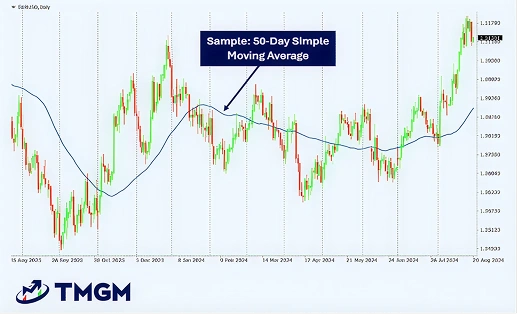
You can identify moving averages in the MetaTrader 4 forex trading platform and use them for a variety of traded assets because they look at average price movements over a specific period. They’re known as lagging indicators because they use past data to identify future support or resistance levels.
Relative Strength Index (RSI)
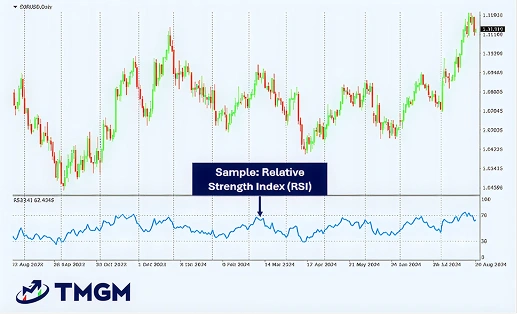
You can judge the potential momentum of a price increase/decrease using RSI. This indicator measures the speed and magnitude of a price change. The result indicates whether the security is over or undervalued. You can also explore other technical analysis tools to strengthen your chart readings.
Moving Average Convergence Divergence (MACD)
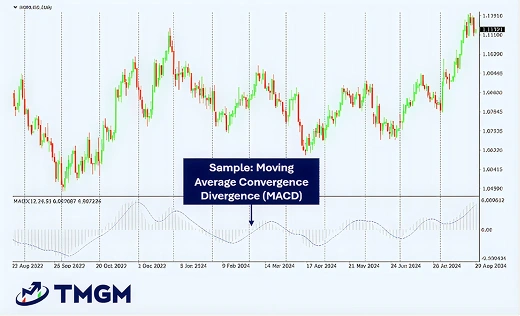
Our guide to MACD provides an in-depth look at this technical indicator and concepts integral to it, such as exponential moving averages. A simple definition of MACD is that it indicates potential entry and exit points based on average price movements over a specific timeframe.
Custom MetaTrader 4 Indicators
In addition to these standard technical indicators, forex MT4 traders have come up with their own indicators and solutions. See our algorithmic trading guide for more ways to automate your strategy. These indicators are available via a public library inside MetaTrader 4. Some of the most popular custom MT4 indicators are:
- Order history indicator – overlay previous trades onto charts to easily view your past trades’ profits or losses.
- Pivot points indicator – paste pivot points onto charts and set up alerts so you can see potential upward and downward movements.
- High-low indicator – use this indicator to find historical price highs and lows for any timeframe.
- Renko indicator – add Renko blocks to charts so you can see price movements within small periods of time.
- Chart group indicator – link multiple charts on MT4 so you can simultaneously execute one action across multiple markets/assets.
- Freehand drawing indicator – draw lines manually so you can find potential patterns on MT4 charts.
MetaTrader 4 Add-Ons

While MT4’s user-friendly design makes it accessible for novice traders, its true potential is unlocked with third-party add-ons that cater to more advanced trading needs. With a few clicks, you can customise the MT4 platform to meet your specific needs using these popular add-ons:
Trading Automation
You can enable one-click or automatic trades with MetaTrader 4. What’s great about using MetaTrader 4 software through TMGM is that you can develop your own trading strategies and test them. Once you’ve done that, you can execute these strategies via automated trading bots in the MetaTrader 4 (MT4) platform.
Advanced Order Management
You use MetaTrader 4 add-ons, such as T Manager Plus, to execute advanced orders. As a standard, MT4 allows you to make market orders and pending orders, as well as stop loss and take profit orders.
With advanced order management MT4 add-ons, you can analyse the market and execute appropriate orders automatically.
Platform Customisation
You can customise the layout and indicators you use inside the MetaTrader 4 platform. For example, you can customise the colour of candlesticks and indicators on MetaTrader4 charts to reflect your personal trading style.
You can also change the design and size of chart elements. Then, if you want to get more technical and hands-on, you can create your own indicators using the MetaQuotes Language 4 (MQL4) and MetaEditor add-ons.
Market Analysis Tools
Analytics add-ons allow you to unlock the full potential of the MetaTrader 4 trading platform, providing deep insights that can elevate your trading strategies. For deeper insights, you can reference our Market Insight section. For example, the Correlation Matrix is a great tool for finding correlation coefficients between currency pairs.
Similarly, you can add Autochartist to MT4. This scans the market for potential trading options based on signals and patterns.
Sentiment Indicators
In addition to the TMGM Market Buzz sentiment tool, you can add extra sentiment indicators to MT4. The MT4 Sentiment Trader add-on gives you an overview of the long and short positions for each currency pair and displays the results as percentages.
Choosing the Right Indicators and Add-Ons

The number of options you get with MetaTrader 4 can be overwhelming. That’s why we recommend starting with the basics. Download the relevant MT4 software for your device and create an account.
After that, place a few simple buy/sell orders and get used to looking at the charts. Once you’ve done that, start adding indicators to your charts. You can use our Trading Academy to learn more about indicators, as well as different trading strategies for forex, shares, precious metals, and other financial instruments. Once you’re comfortable with the basics, you can consider also using MetaTrader 4 add-ons.
Benefits of Using MT4
With the right knowledge and discipline, you’ve got every chance of making successful trades and getting maximum benefit from the MetaTrader 4 platform. There are also risks involved in trading, and you can learn about them here